Olation® Architecture
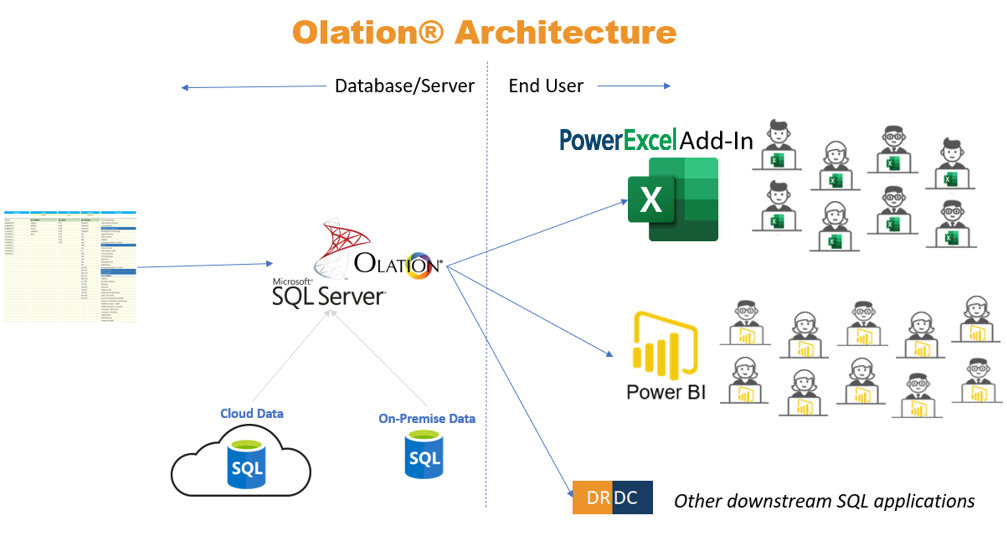
The above diagram is the basic architecture of
an Olation® implementation.
Important Points
- This diagram illustrates Olation operating within
an SQL Server relational database environment. However, Olation can
also be installed to function in other relational database environments,
such as SAP HANA and others.
- Database/Server:
- While the diagram
depicts a single Olation instance, in practice, Olation can be deployed
across multiple servers (2…n) depending on requirements.
- Olation can pull
data from one or multiple relational database environments, as well
as from Excel and text files.
- There is a version
of Olation called Nexus that does not require a relational database
environment. Nexus operates using its own multidimensional database
file(s) and can also connect dynamically to PowerExcel, Power BI,
and other front-end tools. (For more details, see the Nexus
Studio manual.)
- Customized (Multidimensional)
Dimensions can be created independently of relational tables. When
saved, these are stored as relational tables in the installed environment
(e.g., SQL Server).
- Olation is most
often deployed as a Cloud-based application, but it can be installed
on premise as well.
- End User:
- Olation supports
workgroups ranging from as few as five users to hundreds of connected
users.
- Olation offers dynamic
connectivity—including centralized formula results—to Power BI through
a licensed Olation component from PARIS Technologies.
- Olation enables
dynamic table connectivity via DRDC (Dynamic Relational Database Connectivity),
also a licensed Olation component from PARIS Technologies.